
DSX Docking Station – Gas Detector Maintenance Station

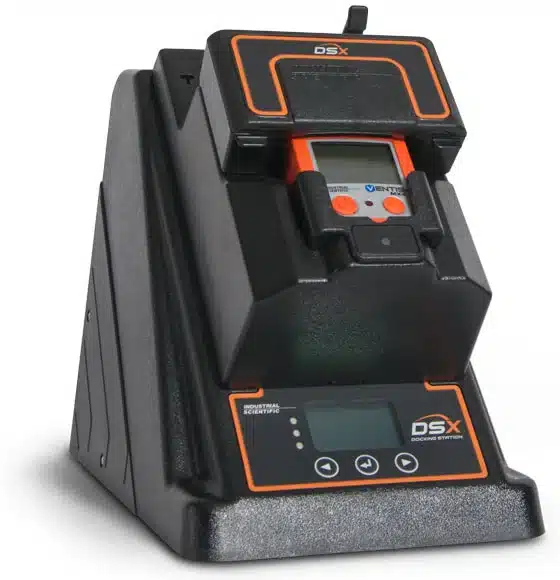
With DSX Docking Station you know the gas detectors keeping your people safe are ready for use every day without the burden of manual maintenance routines.

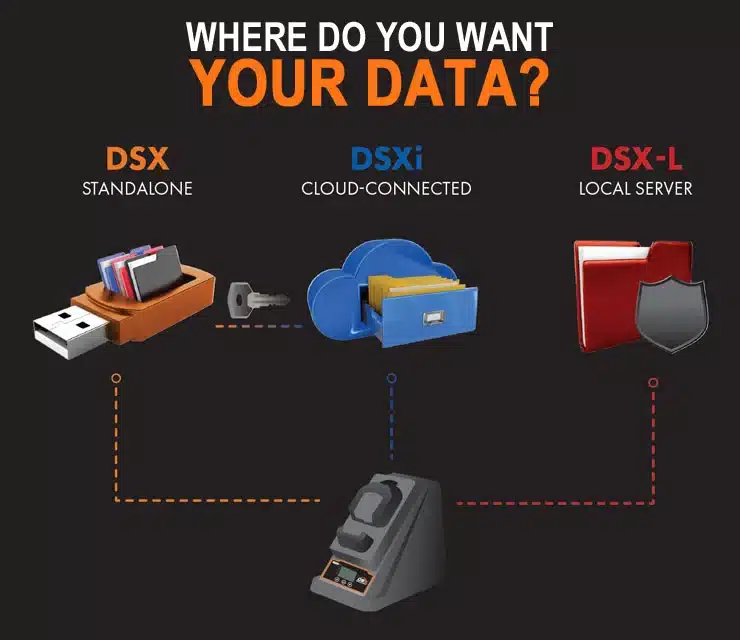
One Docking Station – 3 Modes. Choose the out-of-the-box solution that best fits your needs…


      The DSX Docking Station in standalone mode is a simple out-of-the-box gas detector maintenance station that requires no PC or network configuration.

      • Easy bump testing and calibration of instruments upon dock.
      • Automated record keeping with direct USB data storage eliminates concerns about storage space or losing compliance data.
      • Automatic printing of bump and calibration certificates (with direct connect printer) provides hardcopy printouts for hot work and confined space entry.
      • Automatic instrument wake-up and battery charging.
      • Auto detection of calibration gas type and expiration date upon cylinder connection.

      With the use of a DSXi activation key, the DSX Standalone becomes a cloud-connected, fully-automated instrument maintenance station. There is no need to send anything back for activation – easily perform all upgrades in the field.

      DSX Docking Station Mode Comparison
      Feature Standalone DSX DSXi (Cloud) DSX-L (Local)
      Best For Fleets of 1–3 units; no PC or network configuration required. Automated maintenance, record storage, and fleet management. Storing data behind a corporate network firewall.
      Data Storage Direct USB data storage. Cloud-based storage with automatic back-up. Internal company server (LAN).
      Automation Automatic bump tests and calibrations. Automatic bump, cal, and gas reordering. Automatic bump, cal, and server sync.
      Internet Not required. Required (Ethernet connection). Required (Internal LAN connection).
      Updates Manual firmware updates via USB. Automatic instrument software upgrades. Managed via local network sync.


      The DSX Docking Station in cloud-connected mode is an automated maintenance, record storage, and fleet management solution.

      • Track and set bump test and calibration schedules to perform automatically, ensuring your instruments are ready for use at the start of each shift.
      • Cloud-based data storage provides peace of mind with automatic file back-up, and easy recovery in case of unexpected data loss.
      • Effortlessly manage your fleet, data, and software updates from any web-enabled device.
      • Email alerts and notifications provide information on worker exposure and instrument usage, as well as instrument service needs.
      • Stop worrying about calibration gas. The optional auto calibration gas replenishment program provides an efficient way to manage your calibration gas usage and needs. New cylinders will be shipped to you when you need them.

      The DSX in local server mode provides the option to automatically store data from all docking stations behind a corporate network firewall, addressing network and data storage restrictions or preferences.

      • Track and set bump test and calibration schedules to perform automatically, ensuring your instruments are ready for use at the start of each shift.
      • Automatic instrument wake-up and battery charging.
      • Company and application specific instrument settings are easily set up from within the company network.
      • Configure reports to provide the data you want, when you want it.
      • Calibration gas status indicators provide warning to order replacement gas before a cylinder is empty.

      Standalone

      Optional Auto Bump or Calibrate — Users don’t have to remember to press any buttons or initiate a bump or calibration.

      Standalone Operation — Setup a DSX anywhere without the need for a network connection or connected PC nearby.

      Direct USB Data Storage — Use readily available storage and never worry about running out of memory or losing compliance data.

      Automatic Certificate Printing — Easily get hard-copy printouts for hot work and confined space entry (requires direct connect printer).

      Upgradeable to Cloud — Upgrade at a later date and get all the benefits of cloud-connected mode without swapping out hardware.

      Expired Gas Alerts — Eliminate the safety risk of calibrating with expired gas.

      Cloud-Connected

      Simple Setup — Use immediately out-of-the-box with no training, network configuration, or support required.

      Auto Bump or Calibrate — Reduce dock-to-green-light time to zero by having bumps and calibrations done before a shift starts.

      Instrument Settings Management — Know that your instrument is working and being used properly.

      Email Alerts & Notifications — Know what workers are being exposed to, if instruments are being used properly, and which need servicing.

      Automatic Software Upgrades — Keep instruments running their best with the latest software, free of charge.

      Auto Cal Gas Replenishment* — Let the program monitor and ship replacement gas cylinders automatically when you need them.

      Custom Data Reporting — Configure reports to get the data you want, when you want it.

      Cloud-based Data Storage — Automatically store and access your data via smartphone or tablet.

      Calibration Gas Monitoring* — Stop manually tracking cylinder gas levels and expiration dates.

      Local Server

      Server-based Data Storage — Store data behind the firewall on your company server.

      Auto Bump or Calibrate — Reduce dock-to-green-light time to zero by having bumps and calibrations done before a shift starts.

      Instrument Settings Management — Know that your instrument is working and being used properly.

      Custom Data Reporting — Configure reports to get the data you want, when you want it.

      Cal Gas Status Indicators* — Stop manually tracking cylinder gas levels and expiration dates.

      Frequently Asked Questions

      Does the DSX Docking Station work without an internet connection?

      Yes. In Standalone Mode, the DSX requires no network or PC connection, instead saving all automated record-keeping data directly to a USB storage device. Additionally, DSX-L Local Server mode allows you to store data from all docking stations behind your own corporate network firewall, addressing specific data storage restrictions.

      Can I automate gas cylinder reordering?

      Yes, this is a feature of the DSXi Cloud-connected mode. Through the optional auto-calibration gas replenishment program, the system monitors your gas usage and automatically ships new cylinders to you when the program determines they are needed.

      Is local support available in New Zealand?

      Yes. As a division of Entec, Gas Detectors NZ serves as an authorized service center for Industrial Scientific equipment. We provide local technical expertise, servicing, and support to ensure your DSX fleet remains compliant and operational without needing to send hardware overseas.

      Specifications — DSX Docking Station

      Physical Specifications
      Warranty Two-year warranty – DSX (Standalone) and DSX-L (Local Server)
      Guaranteed For Life™ Program – DSXi (Cloud-connected)
      Instruments Supported
      GasBadge Pro
      MX6 iBrid
      Tango TX1
      Ventis™ MX4
      Ventis™ Pro Series
      Ventis™ LS
      Dimensions GasBadge Pro, Tango TX1: H: 22.7cm; W: 16.9cm; D: 27.3cm
      Ventis MX4, Ventis LS: H: 24.9cm; W: 16.9cm; D: 27.3cm
      MX6 iBrid: H: 25.3cm; W: 16.9cm; D: 27.3cm
      Gas Inlets 3-Port Version: One “fresh” air port, two calibration gas ports
      6-Port Version: One “fresh” air port, five calibration gas ports
      Pump Flow Rate 1.2 SCFH (550 mL / min)
      Communication 10 / 100 Ethernet support, RJ-45 Category 5 Connection
      Display 128 x 64 Dot Matrix LCD
      Performance Specifications
      Operating Temperature Range 0°C to +50°C
      Operating Humidity Range 0% to 80% RH up to 30°C, decreasing linearly to 50% RH at 50°C
      External Power Supply Supply voltage: 100–240 VAC / 12 VDC
      Frequency range: 50–60 Hz
      Current rating: 5A

      Ordering Information — DSX Docking Station

      Part Number Description
      Instrument Configurations
      18109327-AB Ventis™ MX4, Ventis™ Pro Series
      18109328-AB Ventis™ LS
      18109329-AB MX6 iBrid™
      18109330-AB Tango™ TX1
      18109331-AB GasBadge® Pro
      -AB A = DSX Mode:
      • 0 = DSX Standalone
      • 1 = DSXi Cloud-connected
      • 2 = DSX-L Local ServerB = Number of Gas Inlet Ports:
      • 3 = 3 Ports
      • 6 = 6 Ports
      Kits*
      18109400 DSX Standalone Kit: Tango TX1 (H2S)
      18109401 DSX Standalone Kit: Ventis MX4 (LEL, CO, H2S, O2)
      18109404 DSXi Cloud-connected Kit: Tango TX1 (H2S)
      18109405 DSXi Cloud-connected Kit: Ventis MX4, Ventis Pro Series (LEL, CO, H2S, O2)
      Accessories
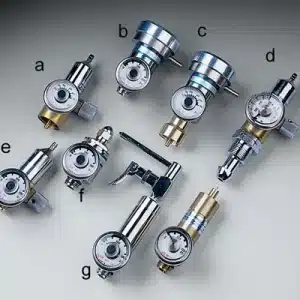
      18105684 iGas® Reader
      18105924 5-Port Gas Regulator Manifold Clamp
      18105932 6-Port Gas Regulator Manifold
      17113887 Ethernet Cable, 5′ (Cat5E network cable)
      17113895 Ethernet Cable, 10′ (Cat5E network cable)
      17113903 Ethernet Cable, 25′ (Cat5E network cable)
      17154813 3G / 4G Router
      17113945 5-Port Ethernet Hub
      18109406 DSX to DSXi Activation Certificate
      *DSX Docking Station Kits Include: Choice of Standalone or Cloud-connected 3-port DSX docking station, 116L calibration gas (appropriate mix) with demand flow regulator with iGas® pressure switch, power cord, USB storage device (Standalone only).

      **Specific terms of the Guaranteed for Life™ Program are included with all products and are available upon request.

      PDF Downloads — DSX Docking Station

      pdf-icon DSX Docking Station Brochure Download PDF
      pdf-icon DSX Docking Station Solutions Card Download PDF
      pdf-icon DSX Setup Guide (DSX Standalone, DSXi, and iNet Accounts) Download PDF
      pdf-icon DSX Docking Station Product Manual (DSXi and DSX Standalone) Download PDF
      pdf-icon DSX Docking Station Specifications Sheet Download PDF
      pdf-icon DSX Docking Station Start-up Guide (DSX-L Local Server Mode) Download PDF
      pdf-icon DSX Administrator’s Guide (DSX-L Local Server Mode) Download PDF